Free & open source · Powered by KataGo
Every game you playis worth understanding.
Open a game and KataGo finds the moves that decided it.Review, practice and AI commentary, all in one app.
The real app
The whole game on one screen.
Win-rate swings, KataGo’s suggestions and the moves that mattered, side by side. No clicking through move by move.
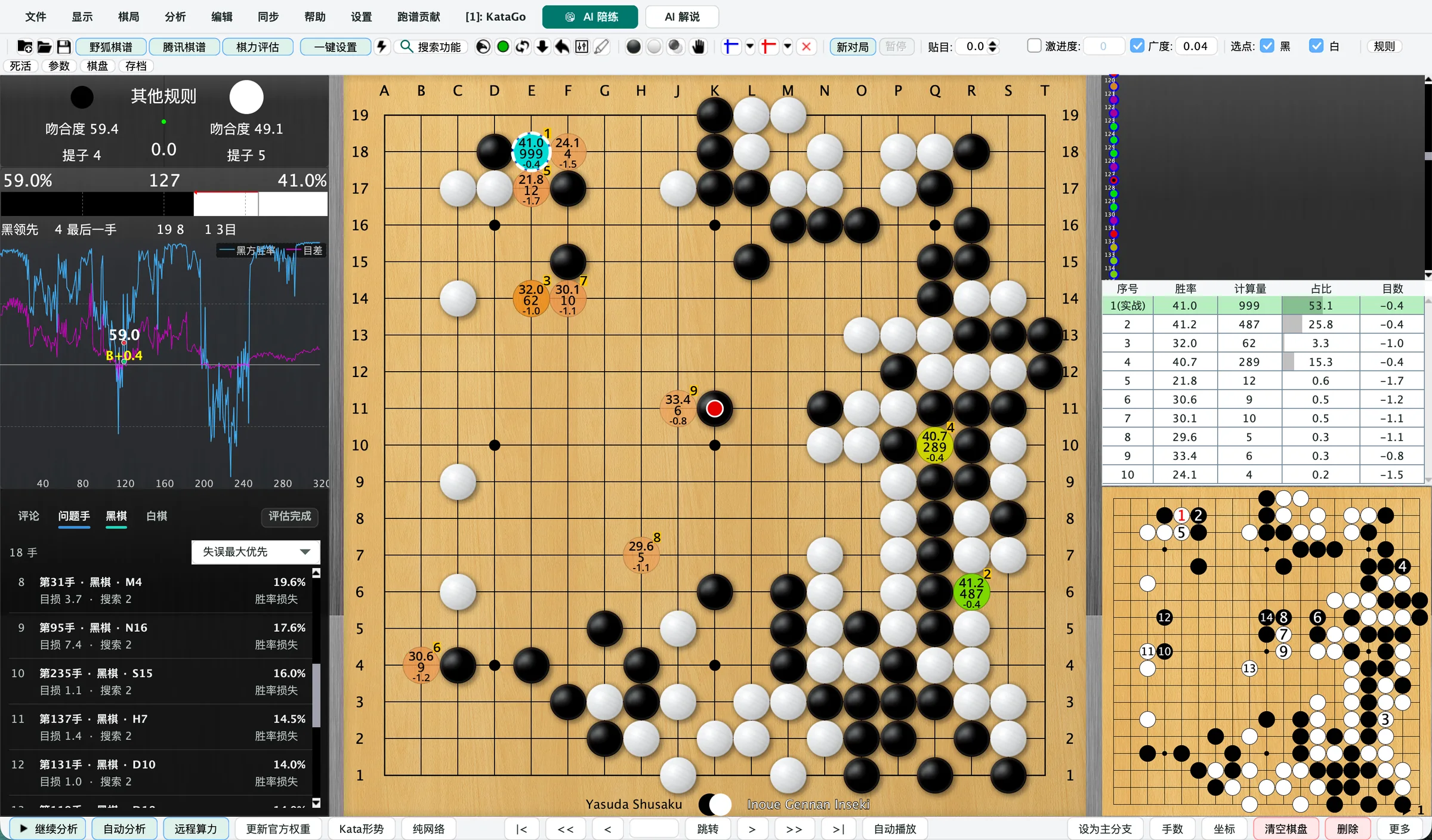
Whole-game win rate
See where you led and where it slipped away.
KataGo suggestions
Each point shows its win rate and visits, so you can compare at a glance.
Problem moves
Sorted by how much they cost. Click one to jump there.
Everything a review needs, in one app
From finding a game to understanding its key moves, the essentials work out of the box.
-
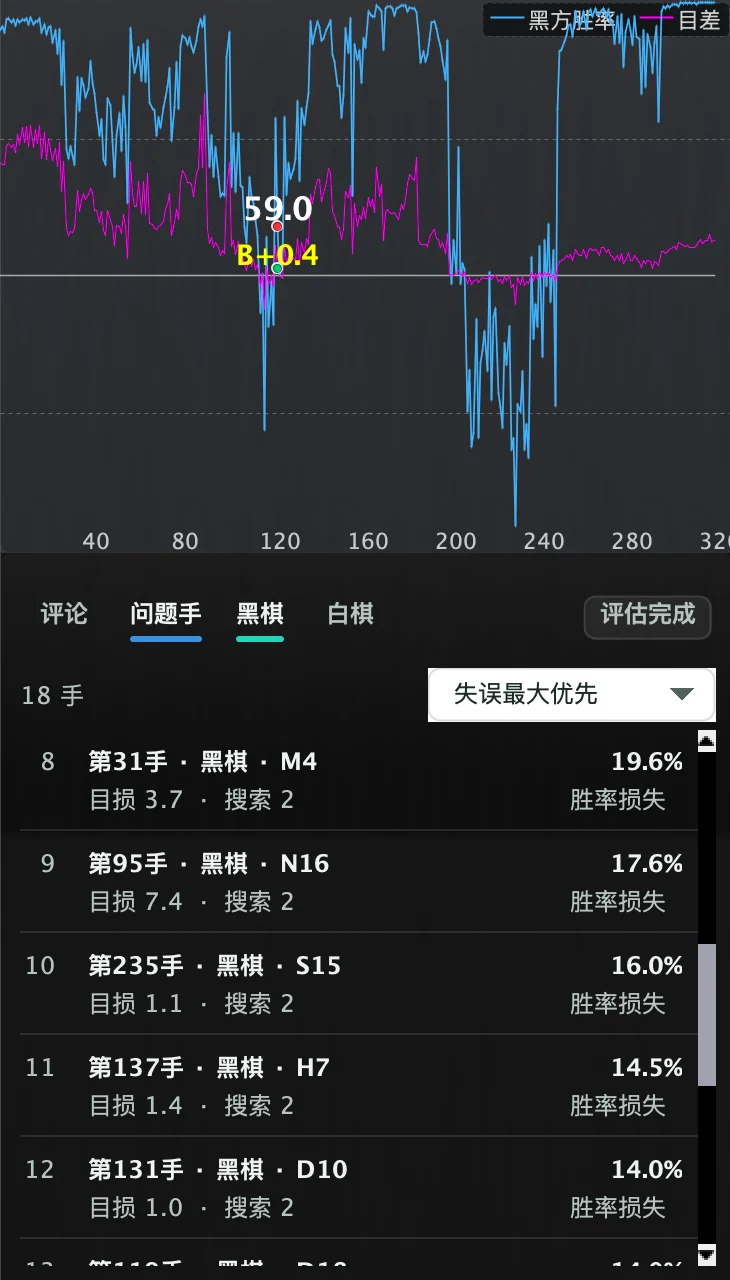
Win-rate graph and problem moves
See how the whole game swung at a glance. The costliest moves are listed for you; click one to jump straight there.
-
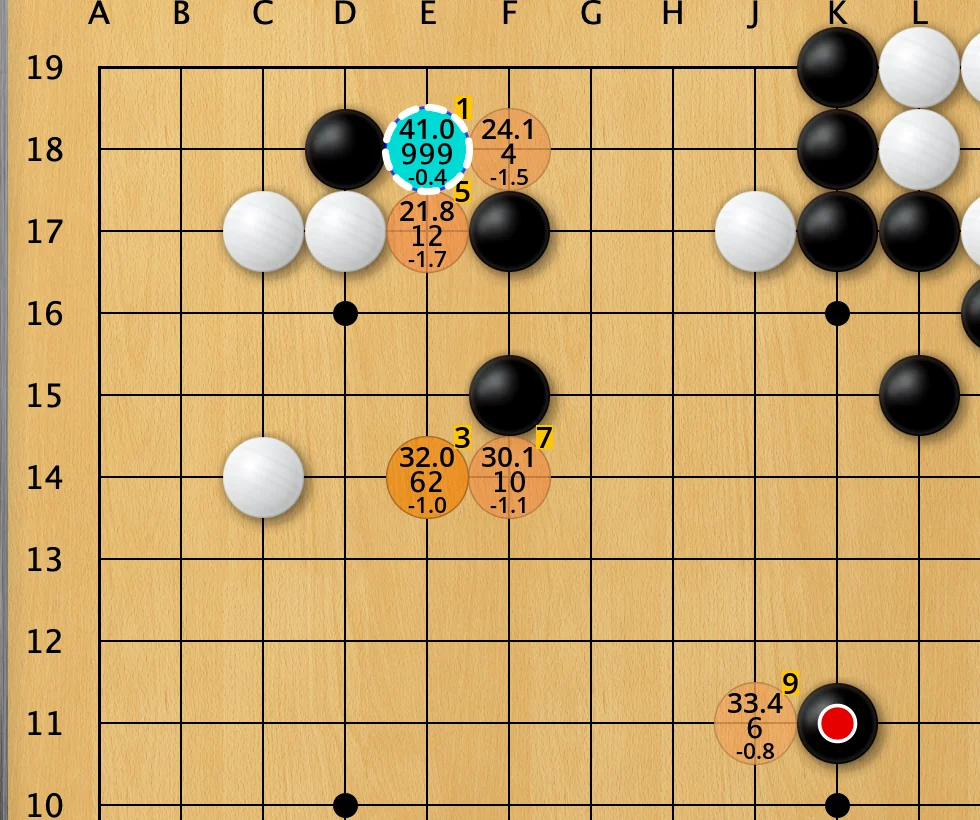
Suggestions you can read
Every suggested move shows its win rate, visits and score lead. Play out the variation and compare.
-
Fox games by nickname
No account number needed. Enter a Fox nickname to find recent public games.
-
Lightning overview
Analyze the whole game in one click to see the big picture, then use “Whole-game deep analysis” where it matters.
-
Board sync
Recognize the board in Fox and other Go clients and analyze it live (Windows).
-
AI Coach and AI Commentary
Play practice games against AI at the strength you choose. Connect an AI service and it explains what each move gains or loses.
-
Ready out of the box
Complete packages include the KataGo engine and a default network. Unzip and open; the first launch sets everything up.
AI commentary requires your own service connection. Provider usage limits and fees apply.
Start reviewing in three steps
No jargon needed. Just follow along.
-
Open a game
Open a game file, or enter a Fox nickname to fetch recent games.
-
Analyze in one click
Choose “Whole-game lightning overview” and KataGo charts how the game swung.
-
Understand the key moves
Jump to the problem moves and compare them with KataGo’s suggestions to see what went wrong.

LizzieYzy Next
Pick your version and start
Choose the build for your computer, unzip and run. More versions and install help are on the download page.Windows
Use CUDA for NVIDIA RTX 20 / 30 / 40 / 50; RX 9000 can try ROCm, while other graphics should use OpenCL
- —
NVIDIA CUDA Recommended
One build for RTX 20 / 30 / 40 / 50
- —
OpenCL compatible
AMD / Intel graphics
- —
CPU universal
Works without dedicated graphics
macOS
Choose the build for your Mac chip
- —
Apple silicon Recommended
M1 / M2 / M3 / M4 / M5
- —
Intel chip
Older Intel Macs
Drag the app to Applications after downloading
Linux
Linux builds for CPU, OpenCL and CUDA are on GitHub.
Get Linux buildsYour next game starts with understanding this one.
Free to download. Unzip and start reviewing.
Download freeA clearer view of the board,a calmer next move.